

Running
Recordings
Every test's flight record in the dashboard, its video, steps, console, network and every provider call, and a prompt to fix it.
Every test keeps a flight record: a video, each step, the page's console and network, and every call and webhook behind it. In the dashboard it opens over the page you came from.
Open one
Click a test, a run's row or a matrix cell. The recording opens on top, and Esc closes it.
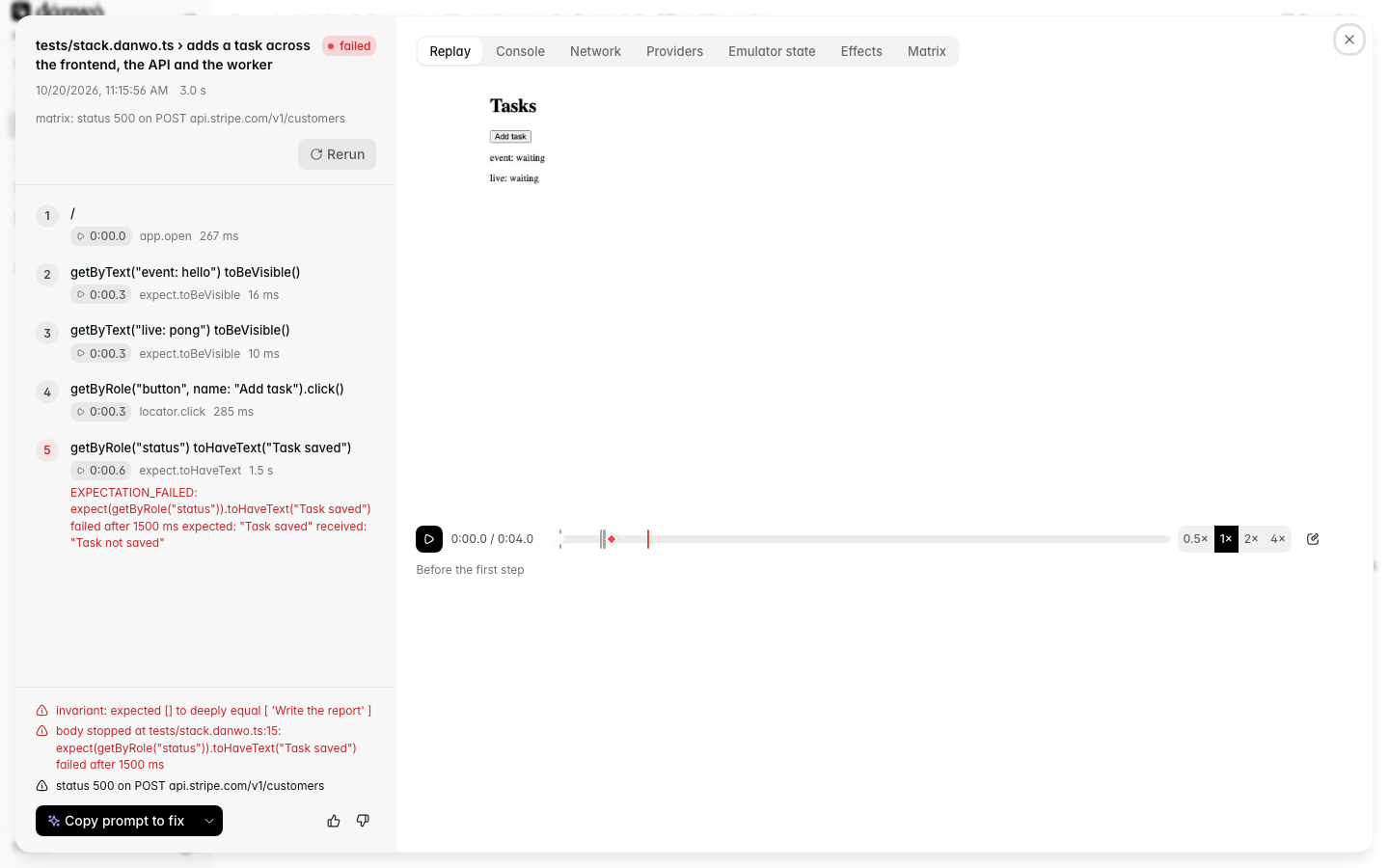
On the left are the steps. Each has Go to, which moves the video to that step. Under them are the error, where the test stopped, the faults and any lint findings.
Follow a popup
When the app opens a popup or a new tab, such as a provider's "Connect your account" page, danwo
films it as a tab of its own (video/tab-2.webm) and records which tab each step ran in. While
the video plays, the player switches to the tab the step is running in and keeps playing there.
- The scrubber and the steps mark Popup opened: accounts.example.com where it opened, and Back to the app where it closed.
- Steps that ran in the popup have a popup badge.
- Go to shows that step's tab.
- The clock reads from the first video, so a step's time is the same in every tab.
- The Tab buttons still switch tabs by hand.
See what each step did
In the video, a cursor moves to each element before the test acts on it. A box outlines the element, a ripple shows a click, and a typing badge shows a fill. This includes the agent's actions.
The cursor never shows in a compared screenshot or in one the model reads. It is drawn only while video is on, and adds about 0.2 s to each action. To turn it off:
video: { mode: "on", cursor: false },Read the checks
After the steps comes Checks: what ran once the browser was done. First, the wait for background work, such as webhooks and Inngest runs, with how long it took and what it waited for. Then each check your invariant made, with a ✓ or ✗.
}).invariant(async ({ app, stripe, expect }) => {
  expect(await grantedCredits(app.baseUrl, "u1"), "credits granted").toBe(500)
})
This check shows as expect(credits granted).toBe(500) with the value it got. When it fails, it
shows what it wanted too. Give a check a message, as above, so its row reads well.
Skip the idle tail
The browser sits still while danwo waits and checks. The scrubber shades these stretches as "settling" and "checks", each with a Go to button. The video plays through them at 4× by default; turn off Idle at 4× to watch them at normal speed.
The tabs
| Tab | What it shows |
|---|---|
| Replay | the video, with steps, faults, settling and checks marked on the scrubber |
| Console | the page's console, filtered by level |
| Network | the page's own requests |
| Providers | a waterfall of steps, provider calls, webhooks and faults; then the calls as a table |
| Emulator state | what each emulator held when the test ended |
| Effects | what each step was expected to change, and what it did |
| Matrix | on a trial: the fault it ran under, and its verdict |
Read the calls behind a step
The Providers tab lines up every call with the step that caused it:
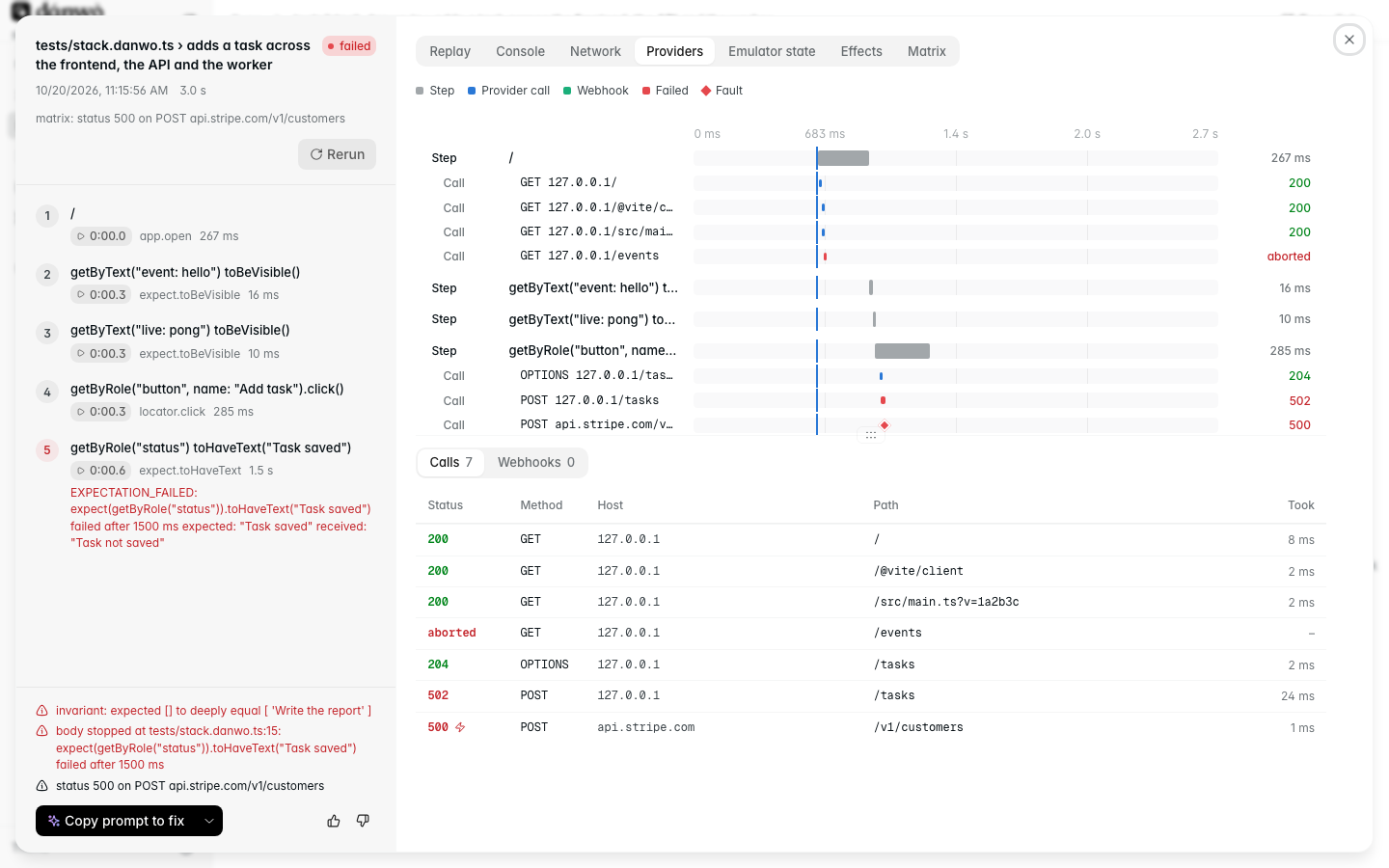
Click a call to see its request and response. Secrets are redacted before the record is written, so they never reach the page.
Copy a prompt to fix it
Copy prompt to fix copies the failure as a prompt for a coding agent: what failed, where, the calls and faults around it. The menu next to it copies the same page as Markdown.
Link to a moment
| Address part | Opens |
|---|---|
?open=<record> | that recording |
&pane=providers | that tab |
&t=12.5 | the video 12.5 seconds in |
#step-3 | the video where step 3 starts |
What's kept
| Setting | Kept |
|---|---|
record: "always" (default) | every run's flight record |
record: "on-failure" | only failed runs' |
record: { keepRuns: 50 } | how many of the newest runs keep recordings |
video: "on" (default) | a video with every record |
video: "retain-on-failure" | videos of runs that didn't pass |
video: "off" | no video |
video: { cursor: false } | video without the cursor and click marks |
Older runs' recordings are deleted as each run finishes. danwo test --keep-runs 200 keeps more
for one run. The run summaries the dashboard lists stay longer (200 runs), so an old run's row
reads recording deleted and its Watch button is turned off.
When a video or screenshot is missing
A record that lacks a video or a screenshot says why, in its missing list. The Replay pane and
the HTML report show it as Video not saved: …:
| Cause | What happened |
|---|---|
failed | the browser or the disk failed to save it (ENOSPC, a browser crash) |
secret | a secret danwo knows showed on the page as text, so it wasn't kept |
closed | the tab had closed before its step's screenshot |
setting | video: "off" or "retain-on-failure" left it out |
When a run loses a video or screenshot it asked for (failed, or a video withheld for a secret),
the summary ends with one warning line:
danwo: 1 video was not saved (the run's result stands): tests/pay.danwo.ts › pays, the video of tab 1: saving it failed: ENOSPC: no space left on device, write. Each record's `missing` says why.The run still passes or fails on what the app did. A full disk shouldn't turn a green run red.
How much disk it takes
A browser test's video is usually 50 to 250 KB. A run's folder, with its videos, screenshots and
records, is typically under 1 MB for a small suite and grows with the number of tests. Fifty runs
of a 20-test suite come to tens of megabytes. Mobile screen recordings are larger; turn video to
"retain-on-failure" to keep only the ones you'll watch.
record: { mode: "always", keepRuns: 100 },
video: "retain-on-failure",
Video shows the screen as it was. Fields holding a secret show as dots, but a secret your app
prints as text is on screen. Use video: "off" for suites that show one.